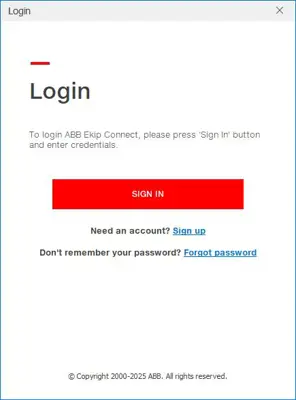
To access the advanced features of Ekip Connect, such as those that necessitate a specific role, the users must log in to MyABB within the tool.
MyABB serves as the shared service that enables users to authenticate themselves across the entire ABB digital ecosystem, utilizing the same credentials.
For users who do not already possess an account, the registration process can be initiated directly within the tool by following the designated registration link.
Registration is entirely complimentary and caters to both business and personal users.
Registration requirements
The e-mail address must not have been previously used to register on MyABB.
The password must be at least 8 characters long and contain 3 different character types: lower / upper case letters, numbers or symbols.
The password cannot be the same as the previous 24.
The minimum password duration is one day, while the maximum is 365 days.
The account will be suspended after six incorrect attempts; users will be required to wait for 30 minutes before attempting to access it again.
Multi-factor authentication is recommended.
Login validity in case of network absence
To facilitate the utilization of Ekip Connect 3’s advanced functionalities even in exceptional circumstances where users require work without an internet connection, Ekip Connect 3 provides users with the capability to save login credentials offline for a duration of 14 days.
This functionality operates seamlessly, without necessitating any user intervention: upon successful login through MyABB, Ekip Connect 3 retains the saved information for a period of 14 days from the most recent instance of the tool’s usage with an accessible internet connection.
After 14 days, if users do not reconnect to the internet using Ekip Connect 3, they will retain access to the tool but will be unable to utilize the advanced features that necessitate login.
Authentication and security best practicesWhile MyABB enforces a minimum password length of 8 characters with complexity requirements, we recommend stronger practices:
Use at least 12 characters for enhanced security
Include mix of upper/lower case, numbers, and symbols
Avoid personal information or dictionary words
Never share your password with colleagues
Change password immediately if you suspect compromise
Do not reuse previous 24 passwords (system enforced)
Multi-Factor Authentication (MFA)
We strongly recommend enabling MFA on your MyABB account:
1. MFA Protection
• Adds second layer of authentication beyond password
• Required when accessing ABB cloud services (Ability, Digital Manager)
• Prevents unauthorized access even if password is compromised
2. Supported MFA Methods
• Time-based One-Time Passwords (TOTP) via authenticator apps
• SMS messages to registered mobile phone
3. Setup Instructions
• In MyABB account settings: "Security" → "Enable MFA"
• Choose preferred MFA method
• Save backup codes in secure location
• Test MFA with login before fully enabling
Session Security
MyABB sessions are managed automatically:
30-day authentication validity after successful login
Automatic timeout after extended inactivity (recommended: 1 hour)
Offline login cached for 14 days for local operations
After 14 days without internet: advanced features require re-authentication
Manual logout available in MyABB account menu
Account Security Monitoring
Monitor your MyABB account for suspicious activity:
Check recent login activity in MyABB account settings
Review "Active Sessions" tab for unexpected locations/devices
Report suspicious activity to ABB Support immediately
Update password if you notice unauthorized access
Loss of Access
If you lose access to your MyABB account:
Use "Forgot Password" link on MyABB login page
Follow email verification process
If email unavailable, contact ABB Support with company verification